VoiceML · Studio
Build VoiceML call flows on a canvas.
VoiceML Studio is a visual editor for VoiceML call flows. Start from a template, add steps from the palette, and Studio writes the VoiceML, checks it as you build, and exports documents ready to publish on voiceml.org. It runs in your browser and needs no account.
How it works
Template, canvas, export, publish.
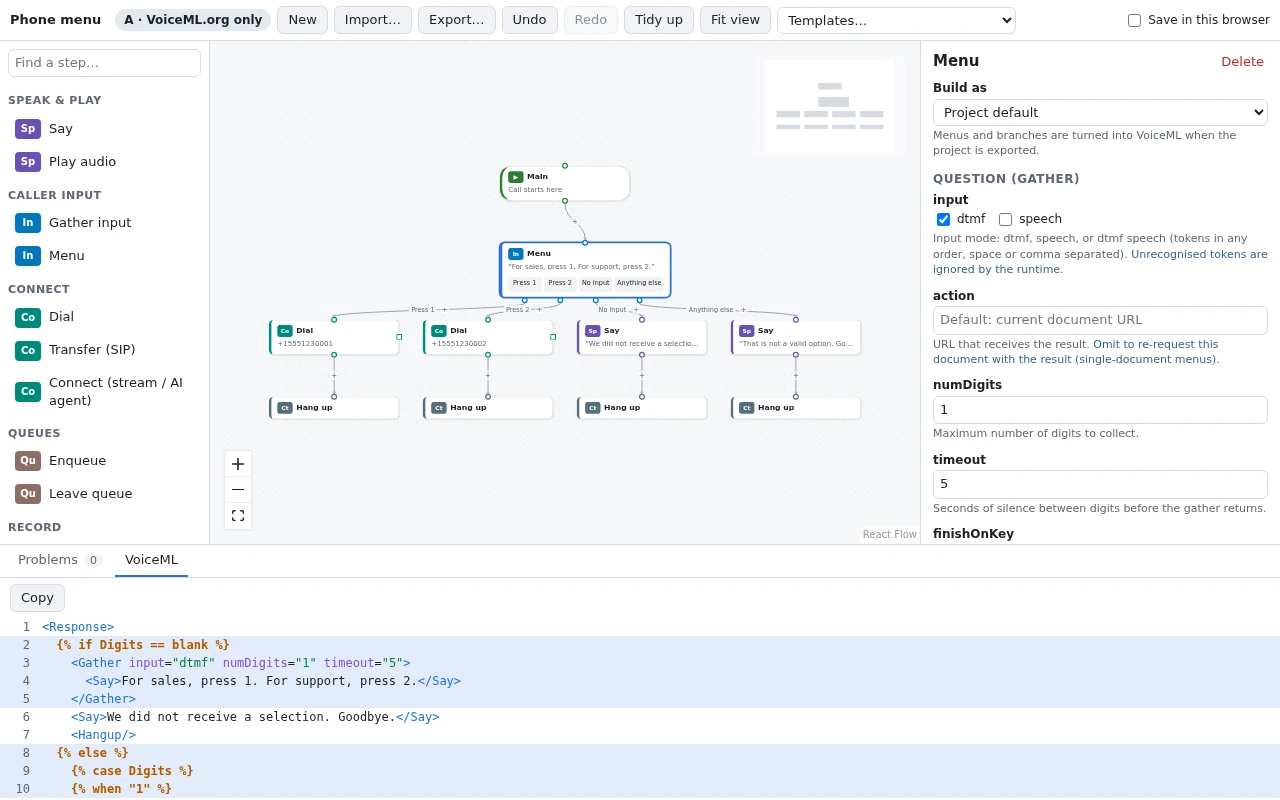
Choose one of 16 templates, or start an empty project. Drag steps from the palette onto the canvas, select each one to fill in its settings, and watch the Problems panel for anything that would fail. Export downloads each document as a VoiceML file, or all of them as a .zip with a project file you can import later.
To go live, publish the documents on voiceml.org in the order Studio lists, paste each URL voiceml.org returns back into Studio so documents that link to it point at the published copy, and set the first document's URL as your phone number's voice URL.

What you get
The call flow on screen, and the VoiceML written for you.
-
Templates for common call flows
Greetings and call forwarding to a number or SIP address, voicemail, call recording with a live transcript, a text during the call, key-press and speech menus, business hours, holiday closures, queues, conferences, and an AI voice agent.
-
Steps for VoiceML verbs
<Say>,<Play>,<Gather>,<Dial>,<Enqueue>,<Record>,<Message>,<Pay>, and more, each with its attributes in the inspector. Background sessions start and stop audio streams, live transcription, and SIPREC recording, and a Raw VoiceML step covers anything else. -
Menus and routing without code
Key-press and speech menus, and branches on the caller's number, area code, the time of day, the date, or a SIP header. On export they become VoiceML: one Liquid template document by default, or separate linked documents.
-
Checked as you build
The Problems panel lists what would break a call or a publish, such as a path that never ends the call, an element voiceml.org won't publish, documents that link in a loop, or a credential that a published URL would expose.
-
Labels what it needs to run
A project is marked VoiceML.org only when it runs entirely from published documents, Needs a server when part of it posts to a small web application of yours, or Advanced integration when it needs an AI agent relay, a media stream, a SIPREC recorder, or a payment connector.
-
Works with the VoiceML Dashboard
The voicemail and record-and-transcribe templates deliver messages and transcripts to the VoiceML Dashboard. Choose Send to the VoiceML dashboard on a callback, enter the recipient's email address, and Studio writes the URL.
Output
Plain VoiceML you can read and edit.
Studio exports ordinary VoiceML documents. The key-press menu above is one document: on the first request it asks the question, and when <Gather> sends the digit back to the same URL, Liquid picks the branch.
Already have VoiceML? Import… takes VoiceML documents (several at once), a saved project, or an exported .zip, or you can paste the markup.
<Response>
  {% if Digits == blank %}
    <Gather input="dtmf" numDigits="1" timeout="5">
      <Say>For sales, press 1. For support, press 2.</Say>
    </Gather>
    <Say>We did not receive a selection. Goodbye.</Say>
    <Hangup/>
  {% else %}
    {% case Digits %}
    {% when "1" %}
      <Dial>
        <Number>+15551230001</Number>
      </Dial>
      <Hangup/>
    {% when "2" %}
      <Dial>
        <Number>+15551230002</Number>
      </Dial>
      <Hangup/>
    {% else %}
      <Say>That is not a valid option. Goodbye.</Say>
      <Hangup/>
    {% endcase %}
  {% endif %}
</Response>
Get started
Pick a template, fill in the steps, publish.
Studio needs no install and no account. To answer calls with what you build, you need a VoiceML account and a phone number.
-
Pick a template
Open VoiceML Studio and choose a template from the toolbar, or select New to start an empty project.
-
Fill in the steps
Select each step to set its numbers, prompts, and options, and clear anything listed under Problems. Tick Save in this browser to keep the project between visits.
-
Publish and point your number
Choose Export…, publish each document on voiceml.org in the order listed, paste each URL back, and set the first document's URL as your phone number's voice URL.
VoiceML Studio FAQ
Do I need an account?
Where is my project saved?
Can I open call flows I wrote by hand?
Open VoiceML Studio.
Start from a template, export the VoiceML, and publish it on voiceml.org.








